Microsoft has released updated Books Online and samples. There are a few cool things in this updated that makes it a must for downloading besides being the most up to date documentation. Rather than repeating Brian Welcker's Weblog on the new updates go and check out it at:
Antics (SQL 2005 Documentation Updates)
To download the latest copy of BOL:
SQL Server 2005 Books Online (December 2005)
Sunday, December 11, 2005


Thursday, December 08, 2005
Big Plug for Dave Duvarney
Well I just came across Dave's Blog. He took SQL 2005 ascend course last year in Sydney. He has also written a couple of books on Reporting Services. Well worth keeping an eye on what he is up too.
Check out:
Dave Duvarney Blog
http://bimvp.com/blogs/dave_duvarney/default.aspx
Check out:
Dave Duvarney Blog
http://bimvp.com/blogs/dave_duvarney/default.aspx
Tuesday, December 06, 2005
Report Builder and the UDM
This month is definitely Report Front end development month. After presenting at our cabana session at SQL Server 2005 launch I have been getting busy with Report Builder and Reporting Services 2005. The project I am working on is a small scale reporting solution.
The UDM
At first I had a good look at using Analysis Services as my main repository for storing all my business logic and handling querying against the source system. This has its advantages; it reduces the load against the source system and offers high performance.
The main disadvantage was the complexity of getting data out of an OLAP solution. Of course it is easy with RS 2005 now, but the navigation across the OLAP cube can be a bit daunting to a novice business user.
Report Builder
Then there is Report Builder. Now there is something, an easy to use interface to create reports against any SQL Server/Analysis Services data source. The report writing is done via a report model. The model removes the need to create queries that require knowledge of the data source. This is great for users that don’t want/know how to join tables.
There is a gap in Report builder when it comes to complex reports. Report builder is a limited report designer allowing users to create reports in a controlled interface. For complex reports I always go for Report Designer. There is a not so well document feature that allows you to create Visual Studio Report Designer reports against a report model.
Russell Christopher wrote a neat little piece on using a report model as a data source. Check out: Using a Report Builder Model as a Report Designer data source in SQL 2005
How about both Report Builder and Analysis services?
The best solution is using a combination of Analysis Service cubes and Report Builder to provide an easy access way for users to reports. Using this hybrid approach will enable high performance query and reporting response times with user interface that’s not a pivot table.
It is a challenge to create a Report Model based on Analysis Services. The quickest way is creating a shared data source in reporting services. Follow these steps:
Mark Russo has also blogged on creating a report model against Analysis services in BI Studio. Check out: Report Builder Model with UDM
The UDM
At first I had a good look at using Analysis Services as my main repository for storing all my business logic and handling querying against the source system. This has its advantages; it reduces the load against the source system and offers high performance.
The main disadvantage was the complexity of getting data out of an OLAP solution. Of course it is easy with RS 2005 now, but the navigation across the OLAP cube can be a bit daunting to a novice business user.
Report Builder
Then there is Report Builder. Now there is something, an easy to use interface to create reports against any SQL Server/Analysis Services data source. The report writing is done via a report model. The model removes the need to create queries that require knowledge of the data source. This is great for users that don’t want/know how to join tables.
There is a gap in Report builder when it comes to complex reports. Report builder is a limited report designer allowing users to create reports in a controlled interface. For complex reports I always go for Report Designer. There is a not so well document feature that allows you to create Visual Studio Report Designer reports against a report model.
Russell Christopher wrote a neat little piece on using a report model as a data source. Check out: Using a Report Builder Model as a Report Designer data source in SQL 2005
How about both Report Builder and Analysis services?
The best solution is using a combination of Analysis Service cubes and Report Builder to provide an easy access way for users to reports. Using this hybrid approach will enable high performance query and reporting response times with user interface that’s not a pivot table.
It is a challenge to create a Report Model based on Analysis Services. The quickest way is creating a shared data source in reporting services. Follow these steps:
- Select the shared data source in report manager
- Click on Generate model button
- Enter a Model Name, Description and Location Click ‘Ok’
- Open Report Builder and select your new model.

Mark Russo has also blogged on creating a report model against Analysis services in BI Studio. Check out: Report Builder Model with UDM
Friday, December 02, 2005
This Months Book Recomendation
Microsoft SQL Server 2000 Data Transformation Services DTS
by Timothy Peterson
With SQL Server 2005 launched and ready to go it is easy to forget that there will be a lot of DTS 2000 systems ticking over for a long time. This means you may need a good reference book with great descriptions of everything DTS wise.
Timothy did an amazing job describing every DTS Task, workflow and practical solution possible. It is the only DTS 2000 book I have in my bookshelf.
I hope Timothy writes a SSIS book I would definitely buy a copy.
by Timothy Peterson
With SQL Server 2005 launched and ready to go it is easy to forget that there will be a lot of DTS 2000 systems ticking over for a long time. This means you may need a good reference book with great descriptions of everything DTS wise.
Timothy did an amazing job describing every DTS Task, workflow and practical solution possible. It is the only DTS 2000 book I have in my bookshelf.
I hope Timothy writes a SSIS book I would definitely buy a copy.
Thursday, December 01, 2005
Get down with the feed!
Ok so it’s taken an email from someone in Sydney to make me finally add a feed to my blog. I am using feed burner to provide a site feed. Now I need to select a viewer for all the other blogs I am reading. Got any suggestions?
For my feed:

For my feed:
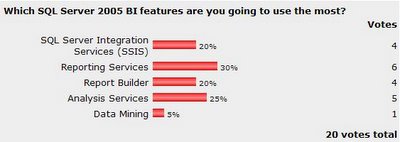
Which SQL Server 2005 BI features are you going to use the most?
Well November has not been a good month for me when it comes to Blogging. I have been flat out doing the Nationwide SQL Server 2005 Launch in New Zealand. It was amazing to meet so many keen SQL Server Developers.
Microsoft was very impressive running three events in Wellington, Christchurch and Auckland. Great support for us Kiwis.
This month I ran a quick poll on ‘What BI features are Developers most interested in’. The results are well inline with what I am doing.
Microsoft was very impressive running three events in Wellington, Christchurch and Auckland. Great support for us Kiwis.
This month I ran a quick poll on ‘What BI features are Developers most interested in’. The results are well inline with what I am doing.
It is interesting to note that only 5% are looking at Data mining, and the shift from ETL(SSIS) to Reporting Services.
Saturday, November 05, 2005
This Months Book Recommendation - Impossible Data Warehouse Situations: Solutions from the Experts by Sid Adelman
Ok so it is time I really recommend a book instead of linking to one in Amazon.
Starting a data warehouse project or in one? Want a worst case scenario guide. Well this book is for you. The book is based on newsgroup posts and real world projects. This book gives you an insight into everything from running a Data warehouse project to managing Tool vendors. I have read this book and found it funny and insightful. It’s the only book I have read that touches on the corporate and political situations that occur on a data warehouse project. It’s most definitely not a book for reading on Client site or at project meetings.
Starting a data warehouse project or in one? Want a worst case scenario guide. Well this book is for you. The book is based on newsgroup posts and real world projects. This book gives you an insight into everything from running a Data warehouse project to managing Tool vendors. I have read this book and found it funny and insightful. It’s the only book I have read that touches on the corporate and political situations that occur on a data warehouse project. It’s most definitely not a book for reading on Client site or at project meetings.
Thursday, November 03, 2005
All Things Reporting Services Blog
Just came across a great Reporting Services Blog By Brian Welcker. Its well worth a look if you are a RS nut. Brian even has a post on moving from CTP to RTM for Reporting Services reports.
Check Out: Direct Reports (Brian Welcker's Weblog)
Check Out: Direct Reports (Brian Welcker's Weblog)
Monday, October 31, 2005
How to install SQL Server 2005 RTM over September CTP
I have just installed SQL Server RTM from MSDN. Here are the steps that worked for me when installing RTM successfully over CTP releases.
Note: You cannot have a side by side installation of SQL sever 2005 CTP and RTM, but you can have a SQL 2000 and SQL 2005 using name instances. This also works for Analysis Services as well.
Step 1: Remove SQL Server 2005 CTP. Using the remove tool (Build Uninstall Wizard) from the original CTP installation files. \..\SQLDEV\Tools\Setup Tools\Build Uninstall Wizard\sqlbuw.exe
Step 2: Uninstall SQL CTP or Beta Tools such as the Upgrade Advisor
Step 3: Uninstall .net framework 2.0.
Step 4: Install SQL Server 2005 RTM from MSDN
Note: You cannot have a side by side installation of SQL sever 2005 CTP and RTM, but you can have a SQL 2000 and SQL 2005 using name instances. This also works for Analysis Services as well.
Step 1: Remove SQL Server 2005 CTP. Using the remove tool (Build Uninstall Wizard) from the original CTP installation files. \..\SQLDEV\Tools\Setup Tools\Build Uninstall Wizard\sqlbuw.exe
Step 2: Uninstall SQL CTP or Beta Tools such as the Upgrade Advisor
Step 3: Uninstall .net framework 2.0.
Step 4: Install SQL Server 2005 RTM from MSDN
Sunday, October 30, 2005
Huge week for SQL Server 2005
It’s been a huge week for SQL Server 2005. Microsoft have launched several new initiatives in preparation for November
- New BI developer Qualification, I am looking forward to doing this qualification. Not since SQL Server 7.0 has Microsoft created a certification dedicated to BI developers. Have a look at MCITP: Business Intelligence Developer
- RTM is now available to MSDN subscribers for SQL Server 2005 and Visual Studio. Check out http://msdn.microsoft.com/sql/
Subscribe to:
Posts (Atom)